
Key Takeaways
- Compute is identical, memory isn't: Both models use 17B active parameters, but Maverick's massive 400B total footprint requires multi-GPU clusters, while Scout (109B) fits on a single H100.
- Default to Scout on shared endpoints: Scout's single-card size allows providers to pack it densely, making it the cheapest, most practical choice for standard RAG and chat workflows.
- The self-hosting floor is ₹362/hr: Indian clouds (e.g., E2E Networks) charge ~₹362/hr for an H100. This is your absolute baseline for Scout, before adding heavy Kubernetes and engineering overhead.
- Utilization dictates ROI: Self-hosting only saves money if sustained 24/7 traffic eliminates idle GPU time. For spiky or growing workloads, pay-per-token shared endpoints are significantly cheaper.
- The 700M MAU cap is a formality: Meta's license limit rarely affects standard Indian startups unless you are embedded in a massive national platform; it's a legal checkbox, not a growth blocker.
For engineering leads in Bengaluru, Gurugram, and Hyderabad evaluating Llama 4 for production workloads, the decision typically comes down to two critical questions:
- Which variant should you deploy?
- Does the math favor self-hosting on dedicated GPUs in Mumbai over calling a shared API endpoint?
To answer both, this analysis relies entirely on primary sources: Meta’s official model documentation and published licensing, AWS’s infrastructure announcements, and direct pricing pages from Simplismart and E2E Networks. We have excluded aggregator blogs and unverified benchmark leaderboards entirely.
The Architectural Reality: Memory vs. Compute
Before diving into the financial modeling, there is a crucial technical distinction that dictates the entire self-hosting strategy: Llama 4 Scout and Llama 4 Maverick require the same active compute per token.
Both models activate exactly 17 billion parameters on every forward pass. The difference lies entirely in their VRAM footprint, the total number of parameters sitting in GPU memory waiting to be selected. Scout holds 109 billion total parameters, while Maverick holds 400 billion.
This distinction- memory capacity rather than compute load- is the actual bottleneck that determines whether a model can run efficiently on a shared endpoint or if it will force you onto dedicated infrastructure.
Llama 4 Scout vs. Maverick: What Meta Actually Published
According to Meta's architecture descriptions and AWS's SageMaker JumpStart announcements, Scout and Maverick are positioned for very different use cases. Maverick is explicitly designed to compete with GPT-4o and Gemini 2.0 Flash on multimodal benchmarks. However, their underlying compute mechanics share a surprisingly identical baseline.
The Architectural Breakdown
Clearing up the "128B Active" Misconception
Meta’s model card is explicit: the active-parameter count does not change between the two models. Both Scout and Maverick compute using exactly 17 billion parameters for any given token.
If you have seen claims circulating that Maverick has "128B active parameters," this is a direct mix-up between the number of experts (128) and the active parameter count (17B). Maverick is still a 17B-active model; it simply has a much larger catalog of parameters waiting in VRAM.
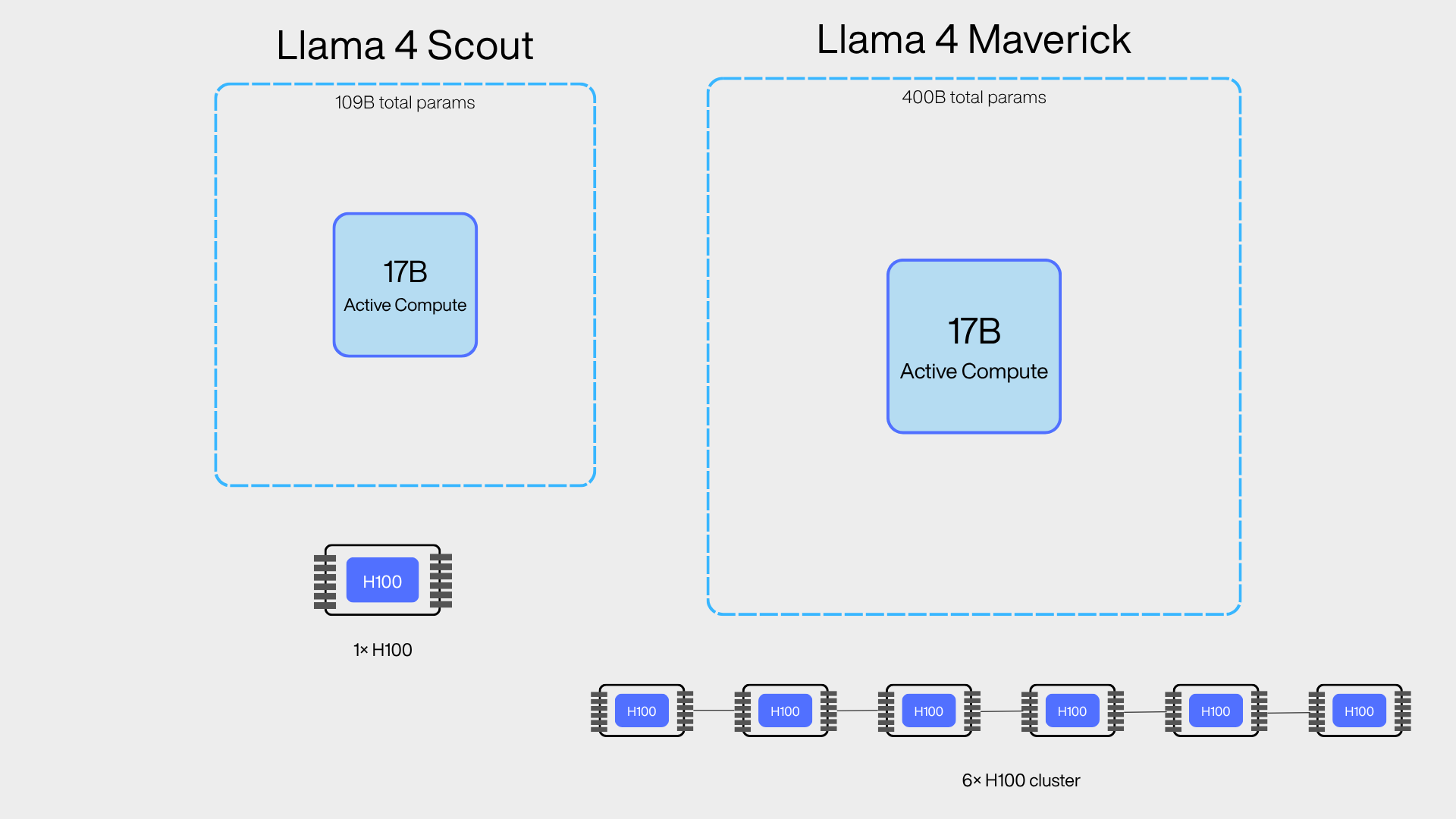
The VRAM Gap: Shared Pools vs. Dedicated Pods
That total-parameter gap is the defining metric for deployment economics:
- Scout (Shared Endpoints): At BF16, Scout's 109B footprint requires roughly 200GB+ of VRAM. However, Meta engineered it specifically to fit inside a single NVIDIA H100 GPU once quantized. This makes it highly economical for shared, multi-tenant endpoints; providers can host one model instance on one GPU and time-slice it across many customers.
- Maverick (Dedicated Endpoints): Maverick’s 400B total parameters simply do not fit that single-GPU pattern. Its massive memory footprint inherently requires a multi-GPU node. (This heavier architectural weight is also why AWS's Bedrock documentation lists Maverick's context window at 1 million tokens, compared to Scout's 10 million). Consequently, most infrastructure providers treat Maverick strictly as dedicated-endpoint or multi-GPU-pod territory, removing it from the cheap, shared-pool ecosystem.
Which Variant Makes Sense on a Shared Endpoint?
For a shared or serverless endpoint, where a provider serves multiple customers from the same pool of "warm" GPUs, the choice between models comes down to tenant density.
Llama 4 Scout: The Practical Default
For engineering teams in India building production chat, RAG, summarization, or agentic tool-calling workloads, Scout is the most pragmatic choice for shared infrastructure.
- The Economics of Density: Because Scout activates the same 17B parameters per token as Maverick, its active compute costs are identical. However, its smaller total-parameter footprint allows providers to pack far more concurrent tenants onto a single GPU without hitting memory limits.
- Widespread Availability: This high-density profile is exactly why Scout dominates standard "serverless" and shared pricing tiers across infrastructure providers.
Llama 4 Maverick: The Heavy-Duty Alternative
Maverick still has a place on shared infrastructure, but the barriers to entry are much higher. Providers can, and do, serve Maverick in a multi-tenant environment, but it requires massive 8-GPU H100 nodes to hold the model in memory.
- The Volume Catch: The economics of sharing a multi-GPU node only work at substantially higher request volumes, as the provider must amortize the cost of a massive resident model across the tenant pool. Consequently, Maverick is far more frequently relegated to dedicated deployments or premium, heavy-compute shared tiers.
The Production Verdict
If your workload consists of standard document QA, long context windows, and heavy tool-calling pipelines, you have to ask whether you strictly need Maverick's marginally higher benchmark scores. If the answer is no, Scout on a shared endpoint is the most defensible production choice for teams optimizing for lower per-token costs and predictable latency.
Self-Hosting Llama 4 in India: GPU Options and Real INR Costs
If you are evaluating self-hosting, your infrastructure decision in India comes down to three primary paths: domestic GPU clouds billing natively in INR, local Mumbai regions of major hyperscalers, or on-prem/colocated setups. Each carries a distinct cost and operational profile.
1. Domestic INR-Billed Clouds
Domestic providers like E2E Networks offer transparent, rupee-denominated pricing for NVIDIA H100 (80GB) capacity:
- Llama 4 Scout (Single H100): On-demand rentals start at ₹362/hour (~₹70/hour for spot capacity). For multi-month commitments (3+ months), rates can drop as low as ₹155.90/hour.
- Llama 4 Maverick (Multi-GPU Node): Because Maverick's 400B footprint exceeds single-card limits, you need a multi-GPU cluster. A 4-GPU H100 node sits at an on-demand baseline of ₹1,448/hour.
2. Hyperscaler Mumbai Regions (ap-south-1)
AWS has rolled out P5 instances (NVIDIA H100s) directly in the Asia Pacific (Mumbai) region with updated on-demand pricing tiers:
- Regional Pricing: Unlike US list prices, Asia Pacific regions often carry local premiums. Current hourly rates must be pulled directly from the AWS Pricing Calculator for ap-south-1.
- Currency & Contracts: AWS capacity is billed in USD by default unless your organization operates under an INR-denominated AWS Enterprise Agreement.
3. The Hidden "Kubernetes Tax"
The raw GPU hourly rate is your baseline floor, not the total cost. Self-hosting requires deploying and maintaining the underlying inference stack (typically vLLM or TensorRT-LLM orchestrating inside Kubernetes):
- Cold Starts & Storage: Model weights, even quantized, require dozens of gigabytes transferred across node memory, creating severe cold-start latencies without custom warm-pooling.
- Cluster Overhead: Managing GPU device plugins, autoscaling policies to prevent paying for idle cards, and custom observability pipelines for non-deterministic model failures all demand ongoing senior engineering hours.
Shared Endpoint vs. Dedicated Pod: Structuring a Fair Benchmark
When comparing a managed shared endpoint (like Simplismart) against a self-hosted H100 pod in Mumbai, high-level marketing numbers rarely tell the whole story.
Relying on Primary Architecture, Not Generic Metrics
Neither Meta, AWS, nor managed providers publish identical head-to-head latency benchmarks for Llama 4 Scout under matched traffic distributions. Rather than using unverified third-party aggregator figures, evaluate each option based on architectural guarantees:
- Managed Shared Endpoints (Simplismart): Offer instant pay-as-you-go access to pre-warmed pools engineered for sub-500ms real-time interactions. Case-study data shows managed warm pools can scale nodes in 60–70 seconds, handling sudden traffic bursts without forcing you to engineer custom cold-start infrastructure.
- Dedicated Self-Hosted Pods (E2E / AWS Mumbai): Provide complete control over vLLM configurations, hardware isolation, and zero multi-tenant contention, but require you to absorb cold-start delays and manage cluster utilization internally.
How to Run Your Own Workload-Specific Benchmark
Published cross-provider benchmarks are notoriously fragile; throughput and Time-to-First-Token (TTFT) vary dramatically depending on batch size, quantization, system prompts, and context lengths.
To determine true unit economics for your production workload:
- Test the Managed Layer: Use built-in benchmarking utilities on managed platforms to capture real-time latency and throughput across your target concurrency.
- Test the Raw Metal: Spin up a single H100 on E2E Networks or AWS Mumbai (ap-south-1), deploy your target quant on vLLM, and stress-test the endpoint using your team's exact production prompt/completion lengths.
- Calculate the Tipping Point: Compare the managed per-token API invoice against the all-in cost (₹362+/hour GPU floor + Kubernetes management overhead) to identify the request volume where dedicated hardware becomes financially defensible.
The 700M MAU Cap: What It Actually Means for Indian Companies
Meta's Llama 4 Community License includes a commercial threshold that is frequently cited but often misunderstood. It is worth looking at the exact mechanism.
The license stipulates that if the monthly active users (MAU) of the products or services made available by the licensee, or the licensee's affiliates, exceed 700 million in the preceding calendar month, the licensee must request a separate commercial license, which Meta may grant or decline at its sole discretion.
For the overwhelming majority of Indian engineering teams evaluating Llama 4, whether building SaaS products, fintech platforms, e-commerce assistants, or internal enterprise tools,700 million MAU is not a near-term ceiling. However, this clause matters in two specific scenarios:
- Platform Distribution: If your product is embedded inside a platform with massive reach (e.g., a feature shipped inside a national telecom operator's app), the "affiliates" clause could aggregate MAU across the parent group.
- Enterprise Legal Review: Your commercial and legal teams simply need to know this clause exists. Crossing the 700M threshold does not automatically ban you from using Llama 4; it just means you need Meta's explicit sign-off to continue. It is a governance checkbox, not an immediate architectural blocker.
What Llama 4 Inference Actually Costs to Run in India
When projecting costs, it is critical to rely on published, verifiable figures rather than aggregator estimates.
Currently, managed providers like Simplismart structure their shared-endpoint plans around pay-as-you-go credits and compute-hour pricing rather than publishing a static, India-specific, INR-per-million-token rate card for Llama 4 publicly. Because serverless AI pricing changes rapidly, the most accurate move is to pull the live per-token rate directly from your provider's console before finalizing your math.
However, the baseline cost for the self-hosting alternative in India is public and clear:
- The Self-Hosting Floor: E2E Networks publishes an H100 (80GB) on-demand rate of ₹362 per hour (or ~₹70 per hour for spot capacity).
- The Calculation: That ₹362/hour is your floor for hosting Scout on a single GPU before factoring in engineering overhead. To compare this against a managed API, divide your expected monthly token volume by the GPU's realistic throughput at your specific batch size. This yields your true self-hosted cost-per-million-tokens.
When Shared Beats Dedicated: A Volume-Based Framework
The decision between a shared endpoint and a dedicated H100 node ultimately comes down to utilization. A shared endpoint charges you per token; someone else absorbs the cost of the GPU when your traffic is low. A dedicated GPU charges you ₹362/hour around the clock, regardless of whether it is processing tokens or sitting idle.
To find your crossover point, use this formula: (₹362 × hours running productively) ÷ (millions of tokens produced in that time) = Your effective dedicated cost per million tokens.
Compare that resulting figure directly against your provider's live shared-endpoint rate.
What Tips the Balance Toward Dedicated:
- High, Sustained Utilization: Your traffic is high and steady enough throughout the day that GPU idle time is negligible.
- Strict Latency SLAs: You require contractual latency guarantees that a shared, multi-tenant pool inherently cannot provide.
- Running Maverick: Your request volume justifies dedicating a multi-GPU node for Maverick’s 400B footprint, rather than paying a premium shared-tier rate.
- Compliance: Data residency or strict auditing requirements force you onto isolated hardware, regardless of the baseline compute cost.
What Tips the Balance Toward Shared:
- Spiky or Growing Traffic: Your workload is seasonal, unpredictable, or still scaling. On dedicated hardware, you would be paying for idle GPU hours.
- Avoiding the "Kubernetes Tax": You do not want to build, staff, or maintain the complex vLLM/Kubernetes operational layer required for self-hosting.
- Pre-Production Agility: The financial risk of over-provisioning dedicated hardware early on outweighs the potential savings of getting it right.
Practical Checklist Before You Commit
Before locking in your infrastructure architecture, run through these baseline checks:
- Validate Scout’s Quality Ceiling: Confirm whether Scout is genuinely sufficient for your use case before reaching for Maverick. Both use 17B active parameters, but Maverick's massive VRAM footprint fundamentally changes your deployment costs.
- Pull Live API Rates: Check the current shared-endpoint INR rate directly from your provider's dashboard rather than relying on cached blog numbers.
- Verify GPU Pricing: If self-hosting, price your GPU-hours directly from the infrastructure provider's official pricing page (e.g., E2E Networks, AWS ap-south-1).
- Review the MAU Clause: Have legal read the actual Meta license, paying special attention to the "affiliates" wording if you are part of a larger corporate entity.
- Run Your Own Benchmarks: Test both the managed API and a raw H100 deployment using your actual production prompts. Generic, published throughput figures will not accurately reflect your specific context lengths and token distributions.
The Bottom Line: How Indian Engineering Teams Should Decide
Evaluating Llama 4 for production in India is not a choice between "cloud vs. self-hosting"; it is an exercise in capacity utilization versus operational complexity.
1. Default to Scout on Shared Endpoints First
For the vast majority of RAG, chat, and agentic workflows, Llama 4 Scout is the production sweet spot. Because it activates the same 17B parameters as Maverick while fitting neatly onto single-H100 infrastructure, shared and serverless providers can price it aggressively. Unless your product genuinely demands Maverick's multimodal frontier benchmarks, starting with managed Scout endpoints keeps your initial capital and latency predictable.
2. The ₹362/Hour Rule of Thumb
Self-hosting on domestic GPU infrastructure (like E2E Networks at ₹362/hour per H100) or AWS Mumbai (ap-south-1) only delivers positive ROI under two non-negotiable conditions:
- High Sustained Concurrency: Your steady-state throughput is dense enough across 24 hours that you aren't paying for idle GPU cycles.
- Engineering Capacity to Absorb the "Kubernetes Tax": Your team has the bandwidth to build, tune, and monitor cold starts, vLLM/TensorRT-LLM serving pipelines, and autoscaling policies.
3. Maverick Demands Dedicated Hardware
If you must deploy Maverick, treat it strictly as a dedicated cluster investment. Its 400B parameter footprint pushes you into multi-GPU territory (e.g., 4× or 8× H100 nodes starting at ₹1,448+/hour), fundamentally altering the financial equation and making shared pools economically impractical for lower volumes.
Summary Matrix
Final Recommendation: Start production on managed shared endpoints with Scout to establish baseline token volumes and latency metrics. Transition to dedicated H100 infrastructure in Mumbai only when your steady-state monthly token output mathematically crosses the ₹362/hour threshold plus your internal operational staffing costs.
Frequently Asked Questions (FAQ)
What is the actual architectural difference between Llama 4 Scout and Maverick?
Both models share the same active compute baseline of 17 billion active parameters per forward pass. The difference lies in their Mixture-of-Experts (MoE) capacity and total VRAM footprint:
- Scout: 109 billion total parameters across 16 experts. Quantized, it is engineered to fit inside a single NVIDIA H100 (80GB).
- Maverick: 400 billion total parameters across 128 experts. It requires a multi-GPU cluster (e.g., 4× or 8× H100s) to fit in memory.
Does Maverick have 128 billion active parameters?
No. Maverick has 128 total experts, not 128 billion active parameters. On any given token, it only routes through 17 billion active parameters, identical to Scout. The difference is the larger parameter catalog resident in GPU memory.
When should a production team choose Scout over Maverick?
Scout is the practical default for most text-centric applications, including RAG pipelines, chatbots, long-document summarization, and agentic tool-calling. Because it shares the 17B active compute footprint with Maverick, it delivers fast inference and can leverage an extensive context window at a fraction of the hosting cost. Choose Maverick only if your workload specifically demands its higher benchmark scores on multimodal tasks and complex reasoning.
What is the baseline cost floor to self-host Llama 4 in India?
For domestic INR-billed clouds like E2E Networks:
- Llama 4 Scout (Single H100 80GB): Starts at ₹362/hour on-demand (~₹70/hour spot, and as low as ₹155.90/hour on 3+ month commitments).
- Llama 4 Maverick (4-GPU H100 node): Starts at ₹1,448/hour on-demand.
For hyperscalers like AWS (ap-south-1 Mumbai), P5/H100 instances are available, but rates are billed in USD by default and subject to regional pricing adjustments.
What hidden costs come with self-hosting on Kubernetes?
Beyond raw GPU hourly rates, self-hosting incurs operational and architectural overhead:
- Engineering Hours: Building, tuning, and maintaining vLLM/TensorRT-LLM runtimes, CUDA drivers, and GPU device plugins.
- Cold-Start Latency: Quantized weights require transferring tens of gigabytes into GPU memory on scale-up without pre-warmed pools.
- Idle Capacity Waste: Paying the fixed ₹362/hour rate during low-traffic periods unless automated scale-to-zero infrastructure is deployed.
How do I calculate the cost crossover point between shared and dedicated?
Use this formula to determine your self-hosted cost per million tokens:
Effective Cost per Million Tokens = (₹362 × Productive Operating Hours) ÷ Total Tokens Generated (in Millions)
If your calculated rate (plus DevOps overhead) is lower than your managed provider's live per-token rate, dedicated self-hosting makes financial sense. If traffic is spiky or low-volume, shared endpoints remain cheaper because you avoid paying for idle GPU cycles.
Does the 700M Monthly Active User (MAU) cap apply to Indian startups and enterprises?
For the vast majority of companies, no. The clause in Meta’s Llama 4 Community License requires entities with over 700 million MAU in the preceding calendar month to request an explicit commercial license from Meta.
However, two caveats apply:
- Affiliates Clause: If your software is distributed via a parent conglomerate or a national platform (e.g., inside a major telecom app), the MAU of all corporate affiliates may be aggregated.
- Legal Governance: Crossing the threshold does not ban usage; it requires formal sign-off from Meta. It functions as a legal review item rather than an architectural barrier.
Can I trust public third-party latency benchmarks?
No. Latency and throughput figures are sensitive to prompt length, completion length, batch size, concurrency, and quantization. Managed warm pools (like Simplismart) provide sub-500ms real-time latency profiles with rapid scaling, but exact Time-to-First-Token (TTFT) and tokens-per-second metrics must be validated against your own production prompt distributions.
What is the recommended rollout path for Indian engineering teams?
- Phase 1 (Validation): Deploy Llama 4 Scout on a managed shared/serverless endpoint to establish baseline accuracy, latency, and real-world token usage without upfront infrastructure commitments.
- Phase 2 (Benchmarking): Spin up an on-demand H100 instance in Mumbai (ap-south-1 or E2E Networks) and run load tests with your specific vLLM configuration and traffic profiles.
- Phase 3 (Migration): Transition to dedicated nodes only when steady-state 24/7 token volume mathematically amortizes the hourly GPU baseline and internal Kubernetes maintenance costs.
Ready to Deploy Llama 4 Without the Infrastructure Overhead?
Skip the complexity of managing multi-GPU Kubernetes clusters, optimizing vLLM kernels, and absorbing 2 AM paging alerts. Whether you are running high-density Scout endpoints or heavy multimodal workloads, Simplismart offers fully managed, high-performance serverless inference infrastructure optimized for Indian engineering teams.
- Instant Scale & Low Latency: Access pre-warmed, production-grade shared pools engineered for real-time interactions with zero cold-start bottlenecks.
- Flexible Deployment Options: Scale effortlessly with pay-as-you-go serverless pricing, or deploy dedicated private clusters with complete resource control.
- Built-In Observability: Monitor TTFT, throughput, and GPU health out of the box without building custom tracking stacks.
Explore Simplismart Inference & Launch Llama 4 Today