
Key Takeaways
- 753B MoE: Activates only ~32B parameters/token for efficient inference.
- 1M Context: IndexShare cuts long-context compute by 2.9×.
- Speculative Decoding: Predicts 5 tokens at a time for faster generation.
- NVIDIA B200 (8× HGX): Supports the model with FP8 weights and long-context KV cache.
- vLLM: Uses Tensor Parallelism (8) and FP8 KV cache.
- Performance: 1,264 output tok/s with 32 concurrent users.
Quick answer: GLM-5.2 is Z.ai's ~753B-parameter Mixture-of-Experts model (roughly 32B active parameters per token) with a native 1-million-token context window. To serve it in production, the practical minimum is a single 8-GPU NVIDIA HGX B200 node (8 × 180GB HBM3e) running the FP8 checkpoint (zai-org/GLM-5.2-FP8) with vLLM at --tensor-parallel-size 8. On that configuration, real-world benchmarks show roughly 1,260 output tokens/sec and 6,300+ total tokens/sec at 32 concurrent requests, with per-user generation speeds around 39-40 tokens/sec. The rest of this guide breaks down exactly why, and exactly how, in reproducible detail.
GLM-5.2 is the third and most advanced release in Z.ai’s (Zhipu AI) GLM-5 model family. Engineered specifically for long-horizon agentic workloads, thisopen-weights model excels at autonomous coding, advanced tool use, and complex multi-step reasoning.
By combining massive scale with breakthrough efficiency, GLM-5.2 delivers state-of-the-art performance for AI agents operating over massive datasets.
GLM-5.2 Specifications at a Glance
For search engines and AI agents scanning for core technical details, here is the architectural breakdown of GLM-5.2:
Core Architectural Innovations
1. Extreme MoE Sparsity
Despite housing roughly 753 billion parameters, GLM-5.2 only activates about 32 billion parameters during a forward pass. This extreme sparsity means you pay the memory cost of a massive model, but only incur the compute cost of a much smaller dense model. As a result, teams can serve this 750B-class powerhouse on a single 8-GPU node.
2. 1-Million Token Context Window via IndexShare
The single biggest leap from GLM-5.1 is the context window, which expands from 198K to a massive 1,000,000 tokens.
To maintain efficiency at this scale, Z.ai introduced IndexShare. Previously, the per-layer indexer (which scores prior tokens for attention) grew quadratically and ran at every layer. IndexShare recomputes this indexer only once every four sparse layers. Nearby layers simply reuse the same token selections, slashing per-token compute by 2.9x at the full 1M context length.
3. Upgraded Multi-Token Prediction (MTP)
GLM-5.2 enhances its MTP module, which doubles as a built-in speculative-decoding draft model. This upgrade increases the accepted draft length by up to 20% over GLM-5.1, significantly boosting generation speed.
4. Adjustable "Thinking Effort"
The model ships with dynamic reasoning budgets. AI agents can now allocate higher "thinking effort" levels to solve hard, multi-step problems, while scaling back for trivial, everyday tasks to save compute.
Deployment & Production Formats
GLM-5.2 ships in two primary checkpoint formats to accommodate different infrastructure setups:
- BF16 (Full Precision): The original, full-fidelity checkpoint for research and specialised fine-tuning.
- FP8 (Production Default): The zai-org/GLM-5.2-FP8 checkpoint is the recommended standard for almost all production deployments. It cuts the memory footprint in half compared to BF16, with virtually no loss of accuracy. Furthermore, this format is specifically optimised for hardware acceleration on NVIDIA Blackwell B200 nodes.
Why the B200 Is the Right GPU for GLM-5.2
While GLM-5.2 is designed for efficiency, serving a 750B-class model at scale demands serious hardware. For enterprise teams evaluating infrastructure, the NVIDIA B200 (Blackwell) has emerged as the definitive hardware of choice over previous-generation Hopper GPUs (H100 or H200).
Here are the three primary reasons the B200 is optimised perfectly for GLM-5.2:
- Massive Memory Capacity: The GLM-5.2 FP8 checkpoint requires roughly 705GB across its safetensors shards just to hold the model weights. An 8-GPU B200 node delivers ~1.44TB of aggregate HBM3e memory, comfortably housing the weights while leaving substantial headroom for the KV cache, activation memory, and CUDA graph overhead. Smaller GPUs simply lack the VRAM to support this on a single node.
- Native Low-Precision Compute: The B200 features a second-generation Transformer Engine equipped with hardware-accelerated FP4 and full-speed FP8 tensor cores. This allows the GLM-5.2 FP8 checkpoint to run natively without any precision-conversion performance tax. Furthermore, B200 supports genuine hardware-accelerated NVFP4 quantisation, a feature absent on Hopper-generation GPUs.
- KV Cache Headroom for 1M Context: GLM-5.2’s massive 1-million-token context window is its standout feature, but it is highly memory-intensive. Serving 1M tokens requires FP8 KV cache quantisation and massive memory bandwidth. Under concurrent, multi-user loads where KV cache pressure compounds, the B200 provides the necessary bandwidth and memory margins that 8xH200 nodes struggle to maintain.
Hardware Compatibility & Alternatives
While the 8×B200 HGX node is the ecosystem standard for production deployments handling concurrent traffic without multi-node sharding, GLM-5.2 remains highly adaptable.
For testing, research, or smaller-scale deployments, the model supports multiple hardware paths:
Ultimately, if you want to unlock the full potential of GLM-5.2, specifically its extended context and blisteringly fast multi-round reasoning, the B200 node is the infrastructure investment that makes it possible.
NVIDIA B200: Full Specification Breakdown
The B200 is NVIDIA’s flagship datacenter GPU, powered by the Blackwell architecture. Built on a dual-die design using TSMC’s custom 4NP process, it packs a staggering 208 billion transistors, roughly 2.6x the count of the previous-generation H100.
Per-GPU Specifications
The Node-Level Impact for GLM-5.2
When you scale the B200 up to an 8-GPU HGX node, the aggregate numbers become massive: 1.44TB of HBM3e memory and up to 130TB/s of NVLink bandwidth for device-to-device communication. Because the TDP jumps to 1,000W per GPU (up from the H100's 700W), liquid cooling is practically mandatory for production datacenters.
For running GLM-5.2, three specific B200 metrics matter more than anything else:
- 180GB Memory Capacity: Dictates how much of the model weights and KV cache can fit per device before requiring complex sharding.
- NVLink 5.0 Bandwidth: Determines how efficiently tensor-parallel communication scales across the 8 GPUs during the prefill and decode phases.
- Native FP4 Support: Unlocks ultra-low-precision serving for team prioritising maximum throughput per dollar.
GLM-5.2 VRAM & Hardware Sizing
Deploying GLM-5.2 requires careful sizing. The memory demand scales with two factors: the weight quantisation format and your target context length.
Pre-Deployment Checklist
Before you spin up your server, verify these requirements on your target node to ensure a smooth launch:
- GPU Count & Memory: Run nvidia-smi to confirm 8 GPUs are visible, each with at least 180GB of free memory, and no rogue processes are holding VRAM.
- Driver & CUDA Version: Ensure you are running CUDA 12.8 with driver 570 (or pull the cu129-suffixed container image for CUDA 12.x).
- NVLink Topology: Confirm all 8 GPUs are communicating via NVLink/NVSwitch, not falling back to PCIe bottlenecks. Tensor-parallelism requires maximum interconnect bandwidth.
- Disk Space: Ensure your model cache volume has at least 800GB of free space to house the 141 safetensors shards (~705GB).
- Container Runtime: Verify Docker and the NVIDIA Container Toolkit are installed. Test this by running docker run --gpus all to ensure the container sees all 8 devices.
- Network Stability: Downloading a 705GB checkpoint from Hugging Face requires a fast, stable, and uninterrupted internet connection.
Step-by-Step vLLM Setup for GLM-5.2 on NVIDIA B200
Deploying GLM-5.2 on a bare 8×B200 HGX node requires Docker and the NVIDIA Container Toolkit. This guide mirrors the exact deployment path used for production benchmarks.
Step 1: Verify GPU Visibility
Ensure all 8 GPUs are recognised, each with roughly 180GB of memory and minimal utilisation.

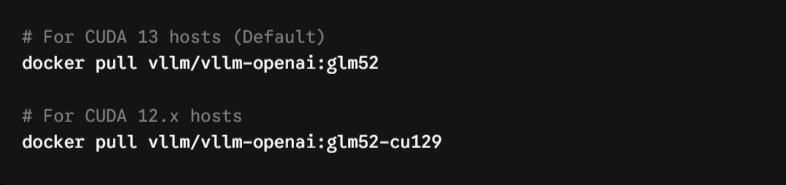
Step 2: Pull the vLLM Container Image
GLM-5.2 requires vLLM 0.23.0 or later. To utilize tool calling and multi-token prediction simultaneously, use the latest main-branch build.
Step 3: Launch the Server
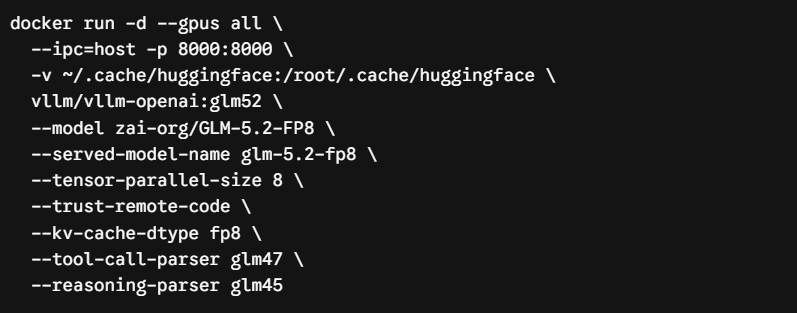
This command deploys the FP8 checkpoint across all 8 GPUs using tensor parallelism, quantises the KV cache to FP8, and enables native tool-calling formats.
Step 4: Verify the Server is Live
The first request will take longer as CUDA graphs warm up. A healthy deployment will return glm-5.2-fp8 in the model list.

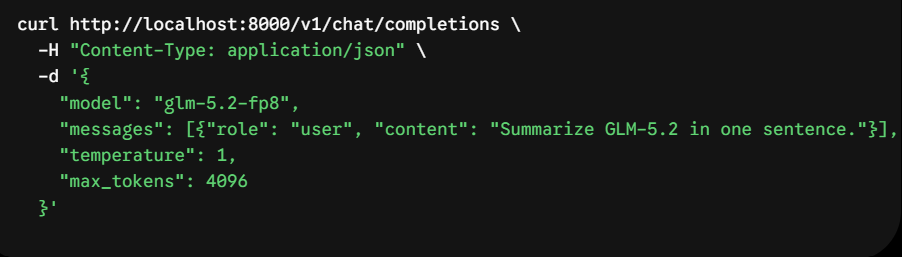
Step 5: Send a Test Request
Step 6 (Optional): Enable Multi-Token Prediction (MTP)
GLM-5.2’s built-in MTP head acts as a speculative-decoding draft model. It proposes up to 5 draft tokens per step, significantly boosting per-user decode speed for coding and structured tasks.

Decoding Key vLLM Deployment Flags
Understanding these flags is critical for tuning your deployment to your specific traffic patterns.
GLM-5.2 on B200: Throughput and Latency Benchmarks
The following data reflects a standardised benchmark on a full NVIDIA HGX B200 node (CUDA 12.8) under a heavy long-context workload (8,192 input tokens, 2,048 output tokens) with 32 concurrent requests.
Performance Tuning for Maximum Efficiency
To squeeze the absolute maximum performance out of your B200 node, consider these advanced tuning levers:
- Enable Multi-Token Prediction (MTP): The single biggest lever for boosting per-user decode speed.
- Use FP8 KV Cache Universally: Even for short contexts, this frees up memory to increase --max-num-seqs and aggregate throughput.
- Tune Chunked Prefill: For massive input lengths, enable chunked prefill to process prompts in pieces. This prevents a single massive prompt from blocking the batch and spiking tail latency.
- Evaluate NVFP4 Quantisation: The B200 features native FP4 tensor cores. If maximising throughput-per-dollar is your top priority, FP4quantisation is a highly viable, hardware-accelerated option with minimal accuracy loss on large MoE models.
- Right-Size Context Lengths: Do not blindly reserve the full 1M token window if your traffic doesn't require it. Capping --max-model-len frees up massive VRAM for higher concurrency.
Troubleshooting Common Deployment Issues
- Out-of-Memory (OOM) on Startup: Usually caused by --gpu-memory-utilization set too high alongside a massive --max-model-len. Lower both to restore your VRAM safety margin.
- Slow First Request: This is expected behaviour. vLLM captures CUDA graphs on the first request. It does not impact steady-state throughput.
- Low Throughput / High GPU Idle Time: Check that all 8 GPUs are communicating via NVLink/NVSwitch. If they fall back to a PCIe interconnect, tensor-parallel communication will choke.
- Malformed Tool Calls: Ensure both --tool-call-parser glm47 and --enable-auto-tool-choice are active. Without them, the output won't match standard agent framework API formats.
- Startup Crashes: Verify your CUDA version matches the container tag. Running a CUDA 13 container on a CUDA 12 host will cause immediate model load failures.
Cost-Efficiency & Final Takeaway
While B200 nodes have a higher hourly rental cost than H100 or H200 variants, they yield a lower effective cost per token for massive workloads. If your traffic demands extended context windows, high concurrency, or FP4 quantisation, the B200 is the most cost-effective hardware choice.
By running the zai-org/GLM-5.2-FP8 checkpoint via vLLM with FP8 KV cache and native multi-token prediction enabled, your 8x B200 node transforms into a high-throughput, production-ready powerhouse perfectly tuned for next-generation AI agents.
Conclusion
Deploying Z.ai's GLM-5.2 in a production environment fundamentally comes down to pairing the model’s architectural strengths, its ~705GB FP8 memory footprint and massive 1-million-token context window, with hardware that can sustain high-concurrency demands.
An 8-GPU NVIDIA HGX B200 node running the native FP8 checkpoint via vLLM represents the ideal blueprint for this workload. Utilising standard tensor parallelism, mandatory FP8 KV cache quantisation, and the model's native 5-token multi-token prediction (MTP) head unlocks optimal performance. Proven benchmark data positions this specific configuration at a sustained output throughput of 1,264 tokens/sec, with total throughput eclipsing 6,320 tokens/sec. This makes next-generation, long-horizon agentic applications entirely viable at enterprise scale.
Frequently Asked Questions (FAQ)
What GPU do I need to run GLM-5.2?
The practical minimum for production serving is a single 8-GPU node. Use NVIDIA H200/H20 (141GB each) for the FP8 checkpoint at moderate context lengths, or NVIDIA B200 (180GB each) if you require the full 1-million-token context window with comfortable concurrency headroom.
How much VRAM does GLM-5.2 require?
The FP8 checkpoint requires roughly 705GB just for weights, necessitating a multi-GPU node. You should allocate an additional 80–160GB (or more) for the KV cache,e depending on your context length and concurrency; FP8 KV cache quantisation is effectively required to serve long contexts efficiently.
Can GLM-5.2 run on hardware other than B200?
Yes. It has documented deployment paths on H100, H200, H20, and Ascend NPU platforms. It can also run on smaller multi-GPU workstations using CPU memory offload for non-production testing, though the B200 remains the recommended target for full-context, high-concurrency production serving.
Does GLM-5.2 support the full 1 million token context on a single node?
Yes. With an 8×B200 node and FP8 KV cache enabled, GLM-5.2 can serve its full native 1,048,576-token context window on a single node, though concurrency at that maximum length will be constrained by remaining KV cache headroom.
What throughput can I expect from GLM-5.2 on a single B200 node?
Under a realistic long-context benchmark (8,192 input / 2,048 output tokens, 32 concurrent requests), a single 8×B200 node running vLLM delivers approximately 1,264 output tokens/sec and 6,320 total tokens/sec, with roughly 39.5 tokens/sec per user.
Does GLM-5.2 support speculative decoding?
Yes. It includes a native multi-token-prediction (MTP) head extended to 5 draft tokens. vLLM can use this directly as a speculative-decoding draft model to increase per-user generation speed, particularly for coding and structured-output tasks.
Is vLLM or SGLang faster for serving GLM-5.2?
Benchmarks on identical B200 hardware show SGLang achieving higher raw output and total throughput, while vLLM achieves a substantially lower time-to-first-token (TTFT). The optimal choice depends on whether your application prioritises aggregate throughput or interactive latency.
What vLLM version is required for GLM-5.2?
vLLM 0.23.0 or later provides stable support. If you require simultaneous tool-calling and multi-token prediction, tracking the latest main branch is currently recommended over the pinned stable release.
Ready to run GLM-5.2 without the infrastructure headaches? Stop wrestling with vLLM configurations and OOM errors. Spin up fully optimised, production-ready deployments on NVIDIA B200 nodes in minutes using Simplismart. Deploy on Simplismart Today